
We help businesses reboot their online ambitions. You'll have a fresh look; a website built for your specific needs, and it's going to be easy to maintain.
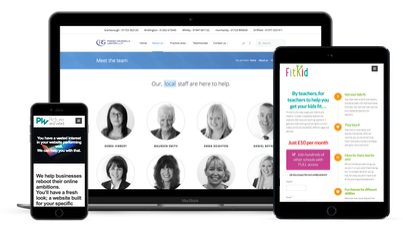
What does a new website get me?
A professional new look
We all like shiny new things, and that includes your website visitors. Most people now use the web via a mobile device and your site will look great on any of those.
Peace of mind
We will monitor your site every minute of every day. Updating and backing up are all taken care of. We keep you updated with regular reports so you can see how your site is doing.
Support
We will give you a website that you'll find easy to maintain. We've even created dozens of videos to show you how the system works, so you can create content yourself.
We've done this before...
Picture and Word have been invaluable in the operation of our site. They offer a professional and very efficient service and are a pleasure to work with. They offer sound advice.Nicola Grunwell - Pinkney Grunwells Lawyers
It was so refreshing to find a company who listened and catered for our needs. They added flair and imagination to our image and made the online resources easy, comprehensive and accessible for our members. Just brilliant!Paul Busby - NUT
When we approached Picture and Word, it was on the recommendation of a friend. We were really delighted with the speed at which they turned our project around and it looked absolutely amazing.Richard Bashforth - Dalby Activity Centre
You just want your website to work...
is that too much to ask?
Building an online brand is not always easy. It's hard to keep up with the latest strategies, the software just won't do what you want it to do, then there's all that updating and security to worry about.
Since 2004 we've been turning business ideas into websites. We know the pain points that you are facing. We can keep your website up to date, we can manage it so that you don't need to worry about it and can focus instead upon growing your own business.
We've done this all this before and helped many clients through the problems that you're facing right now. Our 6 step process means that we get the website that you want by listening to what you need. We teach you the ins and outs of how the website is built, meaning that you can keep your content fresh.
Our process
We've really thought our process through to ensure that we deliver exactly what you want.
You'll be guided every step of the way.
1 - Brief
After meeting with you, we’ll give a very detailed brief of exactly what you need and what we’ll do to meet those needs. You'll understand exactly what is going on.
2 - Sitemap
Next, we’re going to produce a sitemap so that you know what goes where. You’ll see how your information fits into the overall site structure.
3 - Prototype
Then we’ll provide you with a outline of what the site will look like. It’ll show you what you’re going to get in broad outline.
4 - Design
The prototype comes to life in this stage as we add your branding. At this stage you’ll get a real feel for how the completed site will look.
5 - Delivery
We’re almost done and now we go away and for the next few weeks we build the design into reality. We make sure that it all works for you on day one.
6 - Support
Our support packages offer great value to protect the investment that you’ve made. We’re proud of the support that we offer to our clients.